Soccer Games Unblocked: Three Free Browser Football Games, From Ragdoll Chaos to Tabletop Tactics
Soccer games unblocked are football games that open in a browser tab with no download, no install and no account. Aizi’s sports hub has three of them, and they could hardly be more different: one is a one-button ragdoll scramble, one is arcade football with slides and supershots, and one is a tabletop game where you flick round buttons across a pitch.
All three are free, and Aizi itself runs no ads. Pick by mood: chaos, speed or planning.
The three soccer games at a glance
| Game | Best for | Players | Main controls |
|---|---|---|---|
| Soccer Random | Quick, silly matches | Solo vs CPU, or 2 on one keyboard | One key each: W and Up arrow |
| Soccer Legends 2026 | Arcade matches with special moves | Solo, 1v1 or 2v2 against friends | A/D, W, S, X and Z, or arrows and L and K |
| Button Soccer 2026 | Thinking before you shoot | League Mode, World Cup, local 2-player | Click, drag back, release |
Soccer Random: one button, total chaos
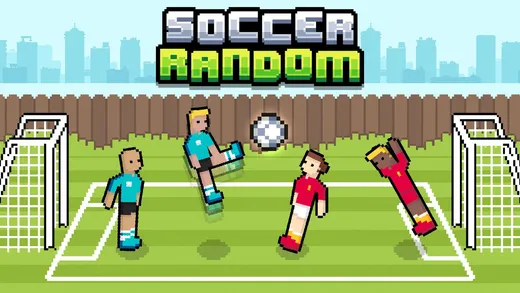
Soccer Random is a physics-based soccer game in a pixel-art style. Each player uses a single key to jump, kick and defend, and the characters move like ragdolls, so their legs swing in odd ways. The field, the ball and the conditions change randomly between rounds, which means no two matches feel quite alike.
You can play alone against the CPU or share a keyboard with a friend. Player 1 uses W, and Player 2 uses the Up arrow, which are far enough apart that you will not bump hands. Watch the score on screen in your first game to see how many goals win a match.
Three habits help here:
- Press with the ball in mind, not the clock. The same key jumps, kicks and defends, so the result depends on when you press.
- Stand between the ball and your goal when it is on your side. Staying put is half of defending.
- Do not mash. Flopping limbs mean repeated presses can throw you away from the ball.
Soccer Legends 2026: arcade football with a supershot
Soccer Legends 2026 is a quick arcade game from MadPuffers. You score more goals than your opponent before time runs out, using movement, jumps and slides, and a supershot when you want to surprise someone.
It has a roster of players with special abilities, such as superkicks and teleportation. The modes are solo play, 1v1 matches against friends and 2v2 matches against friends, and there are tournaments too.
| Action | Keyboard |
|---|---|
| Move | A and D, or Left and Right arrows |
| Jump | W or Up arrow |
| Slide | S or Down arrow |
| Shot | X or L |
| Supershot | Z or K |
Start in solo play to learn the slide, because a slide is how you reach a ball that is just out of range. In a 2v2 game, avoid sending both players after the ball. One forward and one defender is a simple split, and you can swap when the ball changes ends.
Button Soccer 2026: football as a flicking game
Button Soccer 2026 turns the sport into a turn-based game that plays a bit like pool. Each side has round player buttons. On your turn you pick one, pull back to set the angle and power, and let go to hit the ball. Then your opponent takes a turn.
Before kick-off you pick a formation, such as 1-2-2 or 1-3-1. There are three modes: League Mode, the World Cup and a local 2-player mode for two people on one device. Because you can pass between your own players and bank the ball off the walls, the game rewards thinking one step ahead.
The drag goes backward from where you want the ball to go, like a slingshot. A longer pull means a harder hit, and a full-power shot can fly past the goal or hand the ball to your opponent, so save it for clear chances. The game plays in landscape orientation.
Which one should you start with?
Choose by how much time you have and who you are playing.
- Two minutes on your own: Soccer Random against the CPU. The one-key rhythm takes a minute to pick up.
- A friend at the next desk: Soccer Random for laughs, or Soccer Legends 2026 in 1v1 for a more serious match.
- Four people: Soccer Legends 2026 lists 2v2, so each pair can take a side.
- You like puzzles more than reflexes: Button Soccer 2026. Nobody is rushed, because turns alternate.
If you play on a laptop with a trackpad, Button Soccer 2026 is the most comfortable of the three, since it uses only a click and a drag.
How to get better at soccer games in general
The three games differ, but a few habits carry over.
- Learn the one thing the game wants. In Soccer Random it is timing a single key. In Soccer Legends 2026 it is when to slide and when to hold the supershot. In Button Soccer 2026 it is how hard to pull back.
- Defend first. In all three games, a goal you do not concede is as good as one you score. Keep one player, or one button, between the ball and your goal.
- Change something after a goal. If you lose a point to the same move twice, stop doing what you just did. Move your defender, shoot a different angle, or play slower.
- Play against the computer before a friend. A solo match shows how the controls respond, so the first game against a person is not wasted on button-hunting.
Playing with friends on one device
Agree on three things before you start: who takes which keys, how many goals win the match, and who plays next. The first two matter most, because Soccer Random has no set winning score, so you need your own rule. First to five goals is a common choice for a short match.
Sit so both players can reach their keys without crossing arms. Soccer Random is the easiest to share, since its two keys sit far apart. Soccer Legends 2026 has two key sets for each action, such as A or the Left arrow, so check its first screen to see how two players can split the keyboard.
If you want something other than football, the basketball and sports games hub has dunking, one-button hoops and more, and the 2 player games unblocked hub collects duels and board games for two. For a wider list, see the best unblocked games page.
A small tournament for a group
Three games make a natural mini league. Say four friends want a lunch-break tournament: everyone plays everyone once in Soccer Random, since each match is short and nobody has to learn much. The top two then play a best-of-three in Soccer Legends 2026, and the losers play a friendly in Button Soccer 2026.
Keep a score on paper or in a notes app, because none of the games here tracks a group table. It also helps to agree that the winner of each match picks the next game. That small rule stops arguments about which game is fair.
If someone is new, give them a head start in the form of one practice round against the CPU. Nobody enjoys a tournament where half the group is still finding the jump key.
A five-minute warm-up
Before a serious match, spend five minutes on this routine:
- Play one solo round of Soccer Random and focus only on timing the key to the ball.
- Open Soccer Legends 2026 in solo mode and take ten slides, noting how far each one reaches.
- Finish with two Button Soccer 2026 shots at different pull lengths to see how far the ball rolls.
Then go and play the match. You will notice that your first mistakes, the cheap ones, are already out of your system.
What to expect from the physics
None of these games is a football simulator, and that is the point. Soccer Random uses ragdoll physics and random conditions, so the ball can behave differently each round. Button Soccer 2026 behaves more like a tabletop game, where bounces and angles are what you plan around. Soccer Legends 2026 sits between them, with fast arcade movement.
If a match feels unfair, the cause is usually the game’s randomness or a control you have not learned yet, not luck alone. Spend one round just watching what the ball does, then adjust.
 Aizi's tip in Button Soccer 2026, play a short pass before every shot for your first few matches. It teaches you how far the ball rolls for a given pull.
Quick questions people ask before they start
- Do I need to log in? No. All three load without an account. Soccer Legends 2026 offers optional saving if you log in.
- How long is a match? Soccer Legends 2026 plays against the clock, so time yourself in a first match. In Soccer Random, set your own goal target. Button Soccer 2026 also ends when time runs out.
- Can I play on a school or work computer? The games run in an ordinary browser. Who may play on a given device is up to the people who run it, so follow their rules and use breaks.
Questions players ask
What are soccer games unblocked?
On Aizi it means soccer games that load in a normal browser tab with no download, no install and no account. It describes how the game runs. Play where and when your school or workplace allows games.
Which soccer game is best for two players?
Soccer Random is the quickest for two people on one keyboard, since each player needs just one key. Button Soccer 2026 suits a slower, turn-based match, and Soccer Legends 2026 lists 1v1 and 2v2 matches against friends.
What are the Soccer Random controls?
Player 1 uses W to jump, kick and defend. Player 2 uses the Up arrow for the same actions. That one key does everything is the whole idea.
How do I take a shot in Button Soccer 2026?
Click and hold one of your players, drag backward to set the angle and power, then release. On a touch screen, tap and hold, drag backward and lift your finger.
Does Soccer Legends 2026 save my progress?
It can save progress across devices if you log in. You can also play without logging in.
Can I play soccer games on a phone?
Button Soccer 2026 works with touch, using tap, drag and release. For the other two, the pages document keyboard controls, so a laptop is the safer choice.